
Hospitals rarely struggle with a software rollout because the technology is faulty. More often, the trouble begins well before go-live, such as when requirements were never clearly defined, clinical teams were consulted too late, or legacy data was moved across without review.
The result is familiar to many administrators. Registration queues grow, billing slows down, and staff return to paper-based workarounds.
For hospital owners, medical directors, and IT heads, understanding the mistakes to avoid when implementing new hospital software is one of the most practical steps toward a smooth transition. This article outlines the most common pitfalls and the measures that help prevent them.
Why Mistakes to Avoid When Implementing New Hospital Software are Critical
In most industries, a failed software launch causes inconvenience. In a hospital, it can affect patient safety, medication accuracy, insurance claims, and statutory record-keeping at the same time.
A well-implemented hospital management software platform connects registration, OPD, IPD, pharmacy, laboratory, billing, and reporting into a single workflow. Because these departments depend on one another, a weakness in one area quickly appears in the others.
This interdependence is why healthcare implementations demand more rigorous planning than a standard IT project.
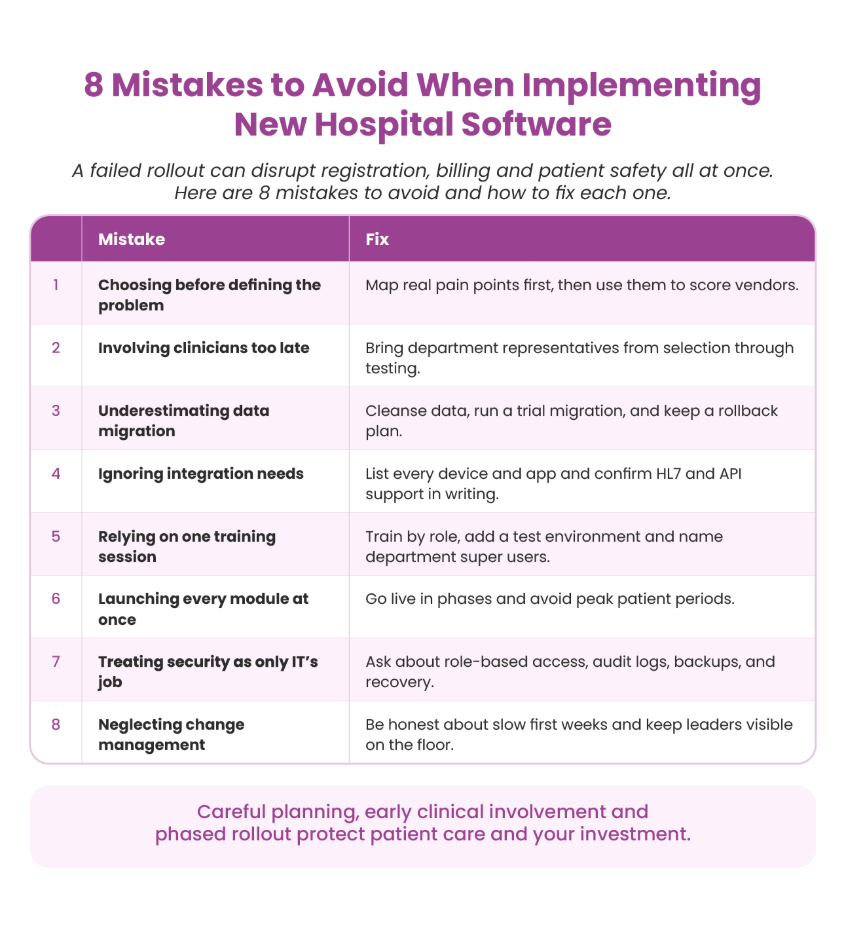
1. Selecting a System Before Defining the Problem
A common error occurs before vendor shortlisting even begins. A leadership team sees a polished demonstration and commits, only to find later that the admission or discharge process does not reflect how the hospital operates.
A 20-bed nursing home, a diagnostic-led center, and a multi-speciality hospital have very different operational needs. Begin by documenting current challenges: the time taken for discharge, the sources of billing errors, and the reports that reach management late or not at all.
Gather this input from the staff who carry out the work daily, not only from department heads. These findings then form the evaluation criteria for every vendor you consider.
2. Involving Clinical Teams Too Late
When a system is chosen at management level and introduced to clinicians on go-live day, resistance is almost inevitable. Doctors working within short consultation windows will not accept software that adds avoidable steps. Nurses will develop their own shortcuts as soon as a process slows them down.
A better approach is to include respected representatives from each department during selection, configuration, and testing. They can identify workflow gaps early and later serve as trusted points of support for their colleagues. Technology partners such as Ezovion generally see stronger outcomes when frontline staff participate in workflow mapping from the outset.
3. Underestimating Data Migration
Patient histories, tariff lists, doctor masters, inventory records, and outstanding bills must all be transferred accurately. In practice, this data is usually less tidy than expected, with duplicate patient IDs, inconsistent spellings, outdated rate cards, and the same drug recorded under several names.
Importing unclean data into hospital software simply carries existing problems into a new environment. Cleanse the data first and decide what must be migrated versus archived. Run at least one trial migration and ask pharmacy, laboratory, and billing teams to verify their own figures. Maintain a rollback plan, as discrepancies are often discovered only after go-live.
4. Overlooking Integration Requirements
Hospitals seldom operate on a single platform. Laboratory analyzers, PACS for radiology, biometric devices, payment gateways, TPA and insurance portals, and accounting packages all need to exchange information with the core system.
When these connections are missing, staff must enter the same data twice, which increases errors and frustration. Prepare a complete list of every device and application that must integrate and obtain the vendor’s commitments in writing before signing the contract. Ask specifically about HL7 support and the availability of open APIs.
5. Relying on a Single Training Session
A brief session held days before go-live is rarely sufficient. Staff forget details, new employees join, night-shift teams miss sessions, and comfort with technology varies widely.
Effective training is role-specific, so billing staff, nurses, pharmacists, and doctors each learn only what applies to them. Provide a test environment for hands-on practice, distribute concise quick-reference guides, and appoint a trained super user in each department for everyday queries. Schedule a refresher a few weeks after launch, once real-world questions have emerged.
6. Launching Every Module at Once
Pressure to meet an announced date often leads hospitals to go live on all modules simultaneously. A disrupted OPD on a Monday morning is difficult to recover from, and patients notice.
Where possible, adopt a phased approach. Start with registration and billing, allow teams to stabilise, and then introduce pharmacy, laboratory, and IPD. Complete user acceptance testing properly and avoid periods of peak patient volume.
If the date is unrealistic, postponing a week costs far less than a troubled launch.
7. Treating Security as a Purely Technical Matter
Patient information is among the most sensitive data an organization holds, and healthcare remains a frequent target for cyber incidents. Yet security is often left out of vendor discussions because it is perceived as an IT concern.
Raise these questions directly.
- Does the system enforce role-based access, so that a front-desk user cannot view clinical notes?
- Are audit logs maintained to show who viewed or modified a record?
- How frequently are backups taken, and where are they stored?
- What disaster recovery arrangements exist?
Ensure the answers are documented in the agreement and are consistent with the privacy regulations that apply in your region.
8. Neglecting Change Management
Software adoption depends largely on people. Some staff worry that the system will expose errors, add to their workload, or reduce the need for their role. When these concerns go unaddressed, they surface as slow adoption and informal workarounds.
Be candid that the initial weeks will be slower. Ensure senior leaders are visible on the floor during go-live rather than relying on circulars. When improvements occur, such as quicker discharges or cleaner claims, acknowledge them openly.
Final Thoughts
A successful transition rests on thorough preparation, early involvement of the people who will use the system, and an honest view of how your hospital functions. By addressing the mistakes to avoid when implementing new hospital software described above, you safeguard patient care, staff confidence, and your investment.
If your organization is evaluating new hospital management software and would like a partner experienced in day-to-day hospital operations, the team at Ezovion can support you through planning, implementation, and ongoing optimization.